IVF Cycle Tracker
Welcome
What to do today
Cycle progress
Where you are in the Estrogen Priming Antagonist protocol.
⚠ Important rules for all medications
- Give medications at the same time every day (within 1 hour).
- Cetrotide is time-sensitive — inject as close to 11:00 AM as possible.
- Take Rekovelle and Menopur at the same time, between 4:00–7:00 PM, same time daily.
- The trigger injection (Decapeptyl) must be taken at the EXACT prescribed time — 10:40 PM this cycle.
- Dostinex goes vaginally at bedtime, every 3 days × 4 doses, starting trigger night.
- Do not stop any medication until you have spoken with a nurse.
Today's medication schedule
Full medication reference
Add appointment
Upcoming appointments
✓ Do
- Both partners: stop or reduce smoking, avoid second-hand smoke
- Take 0.4 mg–1 mg of folic acid daily, or a prenatal multivitamin
- Eat a balanced diet
- Stay well hydrated
- If using fresh sperm: ejaculate every 2–4 days once injections start (nurse will tell you when to abstain)
- Tell a nurse if either partner gets an infection or needs new medication (e.g. antibiotics)
- Tylenol (acetaminophen) is OK for pain if needed
- Bring printed schedule to every ultrasound appointment
✕ Don't
- Don't take Aspirin or ibuprofen (Advil, Motrin)
- No alcohol during treatment (both partners)
- Max 2 caffeinated drinks per day (both partners)
- No high-impact exercise: jumping, bending, twisting, weights, jogging, yoga
- No saunas, hot tubs, or hot baths — especially for sperm provider
- No intercourse while on injections
- Don't stop any medication without speaking to a nurse first
- No scented products from the day before retrieval through retrieval day (both partners) — harmful to eggs/sperm
- Nothing to eat or drink after midnight before retrieval
After egg retrieval — recovery rules (Freeze All)
- Rest at home on retrieval day and the day after — no work, no driving for 24 h
- Someone must accompany you home after the procedure
- Eat a light lunch on retrieval day (e.g. soup and sandwich), regular dinner
- Drink a minimum of 2 L of fluid daily (water, juice, Gatorade, soup, Ensure, Boost, ginger ale, caffeine-free soft drinks)
- Weigh yourself every morning — report a gain of 4 lb (2 kg) or more in 2 days
- Tylenol (acetaminophen) or Advil/Motrin (ibuprofen) is OK for cramping after retrieval
- If retrieval was abdominal: dressing can come off after 24 h
- Notify the clinic of any hospital admission within 10 days post-procedure
- No ASA (Aspirin)
- No alcohol for the first 24 hours
- No medications containing narcotics
- No sexual intercourse for 4 weeks
- No strenuous physical activity for 4 weeks (walking is fine) — minimizes the risk of ovarian torsion
Normal after retrieval: tender ovaries and cramping for 2–4 weeks; vaginal bleeding on the day; period 5–10 days post-retrieval (may take 7–10). Call the nurse if pain isn't controlled by medication, heavy bleeding, increased redness/warmth at puncture sites, or fever.
When to call the nurse
- Ext. 201 — to report your period (day 1 full flow), or a positive ovulation test (OPK)
- Ext. 617 — questions during your cycle, or if OPK is not positive by cycle day 17, or if you finished all patches without a period, or no period 3 days after New Expected Menses (NEM)
- 613-722-7000 — after-hours emergencies, ask for the IVF doctor on call
- 1-800-387-8479 — My Momentum 24/7 medication support line
Clinic documents
Your official Ottawa Fertility Centre protocol documents. Open or download them anytime.
Trigger & egg retrieval instructions (Freeze All)
Full instructions from the clinic sheet
Trigger day — Saturday, July 18
- Do not take Rekovelle or Menopur today.
- Take your last injection of Cetrotide.
- Stop Decadron and CoQ10.
- Take Milk of Magnesia (laxative) at bedtime — it may cause diarrhea, this is expected.
- Start Dostinex 0.5 mg vaginally at bedtime, every 3 days × 4 doses: July 18 · July 21 · July 24 · July 27.
- Trigger medication: Decapeptyl 0.2 mg (2 syringes) tonight at 10:40 PM — exact time matters.
- Sperm sample is already at the clinic and today's blood work is done — no pickup or extra test needed.
Sunday, July 19 — day before retrieval
- Blood test (Freeze All only) at 8:30 AM.
- Ativan (Lorazepam) 1 mg — mild sedative, 1 pill at bedtime if desired.
- Nothing to eat or drink after midnight.
Monday, July 20 — egg retrieval (OPU)
- Do not use any scented products — harmful to eggs/sperm.
- No breakfast, no foods or liquids. You may brush your teeth. Partner/support person can eat.
- Weigh yourself this morning.
- Take Flagyl (Metronidazole) antibiotic with SIPS of water at 8:40 AM.
- Arrive at 9:40 AM, check in at reception.
- You stay about 1 hour after the procedure. You cannot drive for 24 hours — someone must accompany you home.
- Bring your own water bottle for after the procedure.
Day 0 — after the retrieval
- Rest at home; no work, no driving for 24 h (the clinic can provide a sick note).
- Vaginal bleeding today is possible. You'll be told how many eggs were retrieved.
- Tender ovaries and cramping can last 2–4 weeks. Tylenol or Advil/Motrin OK; no Aspirin, no alcohol for 24 h, no narcotics.
- No intercourse and no strenuous activity for 4 weeks (walking is fine) — minimizes risk of ovarian torsion.
- Light healthy lunch (soup + sandwich), regular dinner.
Day 1 and onwards
- Rest at home again; do not drive.
- Drink minimum 2 L of fluid daily (water, juice, Gatorade, soup, Ensure, Boost, ginger ale, caffeine-free soft drinks).
- Weigh yourself every morning — report a gain of 4 lb (2 kg) or more in 2 days.
- The fertilization report (mature/fertilized eggs) arrives in the portal; the nurse calls by end of day 1 to check on you.
- If retrieval was abdominal: dressing off after 24 h. Call the team for heavy bleeding, uncontrolled pain, redness/warmth, or fever.
OHSS flow sheet — record daily
- Date · Weight · Fluid intake (min 2 L/day) · Color/frequency of urination · Shortness of breath · Nausea · Vomiting · Diarrhea · Constipation · Heartburn · Abdominal distention/bloating · Appetite (poor/fair/good).
- You may be asked to call the clinic daily.
Next steps & notes
- Notify the clinic of any hospital admission within 10 days post-procedure.
- The lab notifies you in the portal on day 5 or 6 of how many embryos were frozen; a follow-up appointment with your doctor discusses next steps (and PGT results if tested).
- Period usually comes 5–10 days post-retrieval — normal.
- If your recommended frozen embryo transfer protocol is a natural cycle, follow the Ovulation Prediction — LH Kit Testing for Mock FET Cycles sheet with your period after this cycle.
- Nurse line: 613-686-3378 (7:30 AM–3:30 PM) — Ext 131 Dr Shmorgun & Dr Kotarba · Ext 134 Dr Magee & Dr Jackson.
Pharmacy appointment notes
Meeting notes with pharmacist Glaucia
Cycle status
- Day 1 of Aline's IVF cycle: July 7, 2026.
- Cetrotide usually starts on the 6th day of the cycle — for Aline probably Sunday, July 12 — but wait for the nurse's call to give the go-ahead before starting.
Injection timing
- Menopur, Rekovelle and Decadron: 30–60 minutes of wiggle room if you can't inject exactly at 6:30 PM.
- Cetrotide is the only medication with a hard time — no wiggle room. Take the first dose as soon as the nurse advises, then every following day at 11:00 AM.
Decadron
- Take with food — a full meal, not a snack. It's hard on the stomach.
- Take at least 4 hours before sleep — it can keep you awake.
- If evenings don't work, you can switch to mornings with breakfast — then keep taking it in the morning.
- Take it every day until the nurse tells you to stop.
Storage & transport
- Rekovelle and Cetrotide: refrigerated, 2–8 °C. Never all the way at the back of the fridge — it can freeze, and we don't want that.
- Menopur and Decadron: room temperature.
- If you need to transport Cetrotide or Rekovelle, use a cold bag — cold, not frozen.
Rekovelle pen
- Start by testing the pen: turn the wheel to the first drop and click.
- Aline's dose is 15 mcg. The pen resets the next day, so no adding up — always dial 15.
- When injecting, keep the pen pressed for a count of 5 seconds, remove it from the belly, then release the button (releasing after removal is good practice, not a deal-breaker).
- To remove the pen needle: put the cap back on and twist until it releases from the pen.
- If there isn't enough left in the pen for a full 15 dose, use the second pen.
- Rekovelle pens are known to hold extra medication — it doesn't mean you applied the wrong dose. After the 4 doses of 15: if a full extra dose is left, use it; if not, open the next pen.
Menopur mixing
- Mix 1 mL of the saline liquid with two vials of the powder.
- See the demo video on the mixing in the WhatsApp conversation.
Injection-site rotation — Glaucia's pain-relief protocol
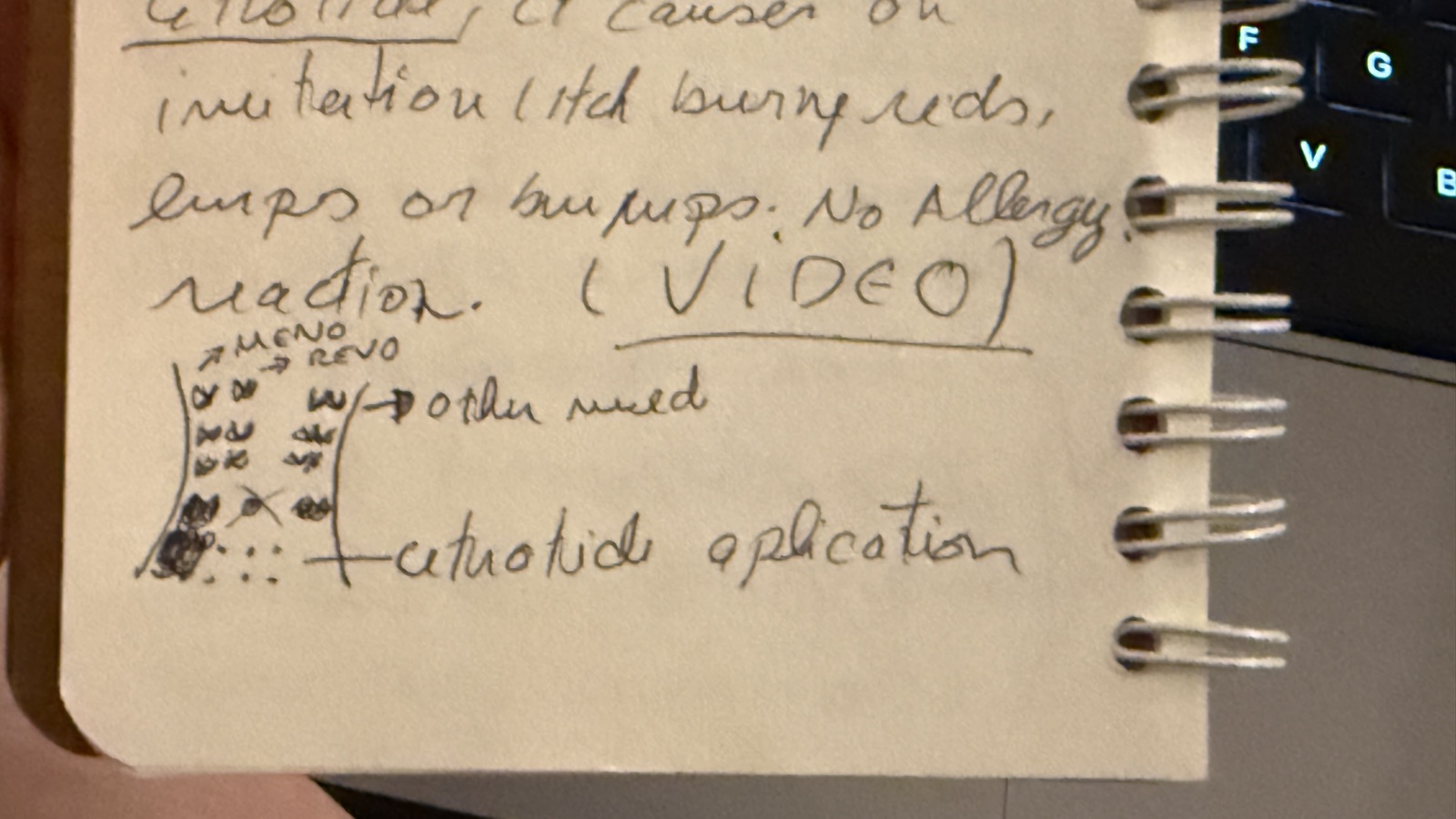
- Stay 2 inches away from the belly button, in all directions.
- Cetrotide goes at the bottom — it can cause burning, redness, lumps, bumps and itching.
- Menopur and Rekovelle on the sides: 3 rows of 2 spots. When the left side is done, move to the right, then come back. It should relieve the pain.
- That Cetrotide irritation is not an allergic reaction (per the appointment sketch).
- A cold pack on the belly before injecting numbs the area and eases the pain.
- See the demo video on mixing and applying Cetrotide in the WhatsApp conversation.
- The rotation sketch from the appointment (the pamphlet also has a drawing):
Side effects & activity
- Possible side effects: headache, nausea (eating a cracker can help), feeling bloated.
- No turning, twisting, bending, or lifting heavy things. Tying your shoes is fine, working is fine — but stand up and walk as much as possible between clients.
- Walking every day helps.
Sharps & medical waste
- All medical waste goes in a hard plastic container, closed with a good amount of tape, and dropped in the mailbox in front of the clinic.
Raw notes: Pharmacy-appointment-notes.txt
How to access the injection videos
- Go to conceive.ca
- Click Videos (top right) → Injection teaching
- Enter password OFCNurse2022
- Click Access my MOMENTUM on the right
- Enter the DIN number of your medication to play its video
Medication video links & DIN numbers
Key contacts
What this app does
This tracker is built around one question: "What do I do today?" You enter key dates as your nurse confirms them — the app does the rest. Every task you see on the Today tab is computed from those dates in real time. Nothing is hardcoded to a calendar; everything follows from when your cycle actually started.
The protocol encoded here is the Estrogen Priming Antagonist protocol from the Ottawa Fertility Centre, drawn directly from the printed PDF instructions provided by the clinic. The section below walks through every rule the app enforces, so you can cross-check it against your own copy of the PDF.
How to use the app — step by step
- Go to Setup and fill in dates as your nurse confirms them. Leave fields blank until you know them — the app adapts as you add more.
- Open the Today tab each morning to see exactly what to do: which injections, which patches, which tests, which precautions.
- Check off tasks as you complete them. Checkmarks are saved per day and reset the next day automatically — your history stays visible on the Calendar page.
- Use the Timeline tab to see your full cycle at a glance — past events, today, and future milestones.
- Open the Calendar page (top navigation) for a month view: green days are fully done, amber partly done, red not done, blue upcoming. Tap any day to see its exact tasks — you can tick off past days retroactively if you forgot to check them at the time.
- Use the Medications tab for a quick view of today's scheduled meds and a full reference list with injection video links.
- Add appointments in the Appointments tab — they'll appear in Today's task list on the day of, and in the Timeline.
- Export a backup weekly using the ↓ Export button at the top. The app stores everything in your browser locally — if you clear browser data, it's gone. Keep a backup.
How the app decides what to show you
Every time the page loads or you save a date, the app runs through today's date against all your setup dates and builds the task list from scratch. Think of it as a set of if / then rules — one per protocol step. Here's the full decision tree:
PHASE 1 — Priming (Cycle Day 1 → Stim Day 1)
- Once Cycle Day 1 is entered: the app tracks what cycle day it is and shows that in the hero banner.
- From Cycle Day 10 up to the positive OPK date (or ongoing while none is entered yet): the app shows a daily task — "Take OPK with first morning urine (ClearBlue). Call ext. 201 if positive."
- If today is Cycle Day 17 or later and still no positive OPK: an additional warning task appears — "OPK not positive by day 17 — call ext. 617." (This warning is live-only — it is not kept in the calendar history once the positive OPK date is entered.)
- Once a positive OPK date is entered: the OPK task disappears from that date onward — earlier days keep their OPK task in the Calendar history. You are expected to call ext. 201 at that point (the app shows this reminder in the task).
- From the First Patch date onward: the app calculates which patch days land on today (patch days are every 2 days; the number of patches is set in Setup — protocol default 8, and the nurse can reduce it, e.g. this cycle used 7). If today is a patch day, the task "Apply estradiol patch #N of M" appears. If a Last patch date is set in Setup, no patch tasks appear after it, whatever the count says.
- During the patch phase (until Stim Day 1 is entered): a standing reminder appears every day — "When your period starts, call ext. 201 to report it. A nurse will advise when to stop your medication. Do NOT stop any medication on your own."
- After the last patch day (first patch date + (patch count − 1) × 2 days; day 15+ with the default 8 patches) if Stim Day 1 has not been entered yet: an urgent reminder appears — "Last patch applied — if your period has not started, call ext. 617 to speak with a nurse."
PHASE 2 — Stimulation (Stim Day 1 → Trigger Day)
- From Stim Day 1 (and until the trigger date): the app shows these three tasks every day:
- Rekovelle 15 mcg injection at your configured evening time (default 18:00)
- Menopur 150 IU injection at the same time
- Decadron 0.5 mg by mouth, once daily
- From the Cetrotide start date (typically Stim Day 6, or as advised — you enter it manually): the app adds a daily Cetrotide 250 mcg task at your configured time (default 11:00 AM). It is marked time-sensitive — within 1 hour.
- Medication end dates (Setup, optional): Rekovelle, Menopur, Decadron and Cetrotide can each be given their own end date — the last day it is taken. When set, that medication's daily task stops after that date (everywhere: Today, Calendar, Medications) and a "Last … day" milestone appears in the Timeline. When blank, the default rule applies: the medication stops at trigger day.
- During stim phase: an info reminder appears every day — "No Aspirin or ibuprofen. Tylenol is OK. No high-impact exercise. No alcohol."
- The stim-phase hero banner shows the current stim day number and days remaining until trigger or retrieval.
PHASE 3 — Trigger Day (per the Freeze-All trigger sheet, received July 18, 2026)
- On the trigger date: all stim injections (Rekovelle, Menopur, Decadron) are automatically removed from the task list (any medication given an earlier end date in Setup has already stopped by then). The trigger sheet confirms: no Rekovelle/Menopur today, stop Decadron and CoQ10.
- Cetrotide still appears on trigger day (last dose per the trigger sheet), then stops.
- A highlighted "★ TRIGGER DAY" task appears summarising the sheet: no stim injections, last Cetrotide, stop Decadron & CoQ10.
- A dedicated task shows the trigger injection: Decapeptyl 0.2 mg (2 syringes) at the trigger time set in Setup (default 22:40 = 10:40 PM per Aline's sheet). It must be taken at the EXACT time.
- A task appears: "Take Milk of Magnesia at bedtime" (may cause diarrhea — this is expected per protocol).
- Dostinex 0.5 mg vaginally at bedtime appears every 3 days × 4 doses, starting trigger night (trigger day, +3, +6, +9 — July 18, 21, 24, 27 this cycle). Each dose is numbered.
- The sperm-kit pickup and "you may require a blood test today" items from the sheet are not shown as tasks — the sample is already at the clinic and the blood work was done on trigger day.
- 2 days before trigger: a warning reminder appears — "Trigger in N days — confirm pickup of trigger medication from Green Valley Pharmacy."
PHASE 4 — Blood Test & Retrieval Day
- Day after trigger: two tasks appear — "Blood test at the clinic at 8:30 AM (Freeze All)" and "Ativan (Lorazepam) 1 mg at bedtime — optional" (mild sedative, only if desired).
- 3 days before retrieval: an urgent reminder appears — "Egg retrieval in N days — arrange a driver."
- Day before retrieval: two tasks appear:
- "Stop using scented products today (both partners)" — harmful to eggs and sperm, applies through retrieval day.
- "Nothing to eat or drink after midnight" — you may brush your teeth in the morning.
- On retrieval day: two tasks appear:
- "Take Flagyl (Metronidazole) with SIPS of water at 8:40 AM" — antibiotic, 1 hour before arrival.
- "★ EGG RETRIEVAL DAY — arrive at 9:40 AM" with key reminders: weigh yourself, no scented products, no breakfast, bring water bottle, ~1 hour stay after, driver needed, no driving for 24 hours.
PHASE 5 — Recovery after retrieval
- Day 1 after retrieval: a task appears — "Rest at home today — do not drive" (fertilization report arrives in the portal; nurse calls by end of day).
- Days 1–10 after retrieval: a daily task appears — "OHSS check: weigh yourself this morning + drink 2 L of fluids today", with the 4 lb (2 kg) / 2 days reporting rule.
- Reminders on the Today tab during recovery: "No driving for 24 hours" (day 0–1, urgent), "OHSS watch" with symptoms and nurse extensions (days 0–10, warning), "Recovery rules — 4 weeks" (no intercourse / strenuous activity, days 0–28, info), and "Embryo report expected" (days 5–6, info).
- Timeline milestones: blood-test day, each Dostinex dose, embryo report expected (retrieval + 5), and end of the 4-week restrictions (retrieval + 28).
- The full clinic sheet is transcribed under Resources → Trigger & egg retrieval instructions (Freeze All), including the OHSS flow-sheet items to record daily.
CALENDAR PAGE — same rules, applied to every date
- The Calendar page runs exactly the same rules listed above against every day of the month — past and future. The logic lives in one shared file (
shared.js) used by both pages, so the calendar can never disagree with the Today tab. - Each day shows a done/total count: green when everything was checked off, amber when partly done, red when a past day has nothing checked, blue for upcoming days. Trigger and retrieval days are marked with a ★.
- Tapping a day shows its full task list. Past days and today can be ticked off (saved to the cloud immediately, same as the Today tab); future days are shown read-only.
- Days before you started using the app may show unchecked tasks — that only means they weren't tracked in the app, not that a protocol step was missed.
- Future days reflect the dates entered so far: e.g. stim injections show every day until a trigger date is entered, because that is what the protocol says to do.
⚠ Assumptions hardcoded — verify these with your nurse
The app encodes this protocol as written in the PDF provided to us. Some values are specific to this patient's prescription and may differ from what other patients receive. Cross-check each of these against your printed instructions:
| What the app assumes | Source | Verified ✓ |
|---|---|---|
| Estradiol patches applied every 2 days. Count is set in Setup — protocol default 8; this cycle the nurse reduced it to 7 (patch #8 not needed) | PDF checkbox (patches selected, not Estrace) + nurse instruction | □ |
| Patch dose: 100 mcg | □ | |
| Rekovelle dose: 15 mcg, subcutaneous pen, evening | □ | |
| Menopur dose: 150 IU, same time as Rekovelle | □ | |
| Decadron dose: 0.5 mg by mouth, once daily | □ | |
| Cetrotide dose: 250 mcg, subcutaneous, 11:00 AM (configurable in Setup) | PDF — time-sensitive | □ |
| Cetrotide starts Stim Day 6 (you enter the date — app doesn't calculate it automatically) | PDF — "or as advised by nurse" | □ |
| Trigger medication: Decapeptyl 0.2 mg (2 syringes) at 10:40 PM (time configurable in Setup) | Trigger sheet (Freeze All), July 18 2026 | □ |
| Dostinex 0.5 mg vaginally at bedtime, every 3 days × 4 doses, starting trigger night (July 18, 21, 24, 27) | Trigger sheet (Freeze All) | □ |
| Blood test 8:30 AM the day after trigger; Ativan 1 mg at bedtime optional that night | Trigger sheet (Freeze All Only) | □ |
| Retrieval day: Flagyl with sips of water at 8:40 AM, arrive 9:40 AM | Trigger sheet (Freeze All) | □ |
| OHSS daily check (weight + 2 L fluids) shown for 10 days after retrieval; recovery reminders for 4 weeks | Post-retrieval sheet + OHSS flow sheet | □ |
| OPK testing starts Cycle Day 10, warning if no positive by Day 17 | □ | |
| Patch 1 starts 2 days after positive OPK (you enter the date as confirmed by nurse) | □ | |
| NEM (New Expected Menses) is not tracked — this applies to Estrace patients only. This patient is on patches, so the app instead warns after patch #8 if no period has started. | PDF (Estrace path — not applicable here) | N/A |
Note: Dostinex and Flagyl/Metronidazole are now tracked (from the July 18 trigger sheet). This is a Freeze-All cycle, so no post-retrieval progesterone (Endometrin/Prometrium) is scheduled — the frozen embryo transfer protocol comes later, per your IVF risk summary.
What the app does NOT track — verify manually
- Your nurse's verbal instructions always override the app. The PDF is the source; the app interprets it. When there's any conflict, call ext. 617.
- Dose adjustments — your nurse may call after each ultrasound to change Rekovelle or Menopur doses. The app shows the PDF starting doses only.
- The OHSS flow sheet values themselves — the app reminds you daily to weigh and drink fluids, but you record the actual numbers/symptoms on the paper flow sheet (transcribed in Resources).
- Post-retrieval progesterone support — not applicable this cycle (Freeze All). The frozen embryo transfer protocol will be its own set of instructions later.
- Partner sperm instructions — the sample is already at the clinic for this cycle; nothing tracked.
Your data & privacy
- Data is stored in Cloudflare D1 — a private database on your own Cloudflare account. No third-party services have access to it. The header shows "✓ Synced" after every save.
- A local copy is also kept in this browser as an offline cache. If the network is unavailable, the app falls back to local data automatically and shows "Offline — local only".
- Both partners see the same data because it is a single shared record — no per-user accounts. Last save wins if both edit at exactly the same moment (rare in practice).
- Access to the app, the API, and the clinic PDF documents is restricted to the two authorised email addresses configured in Cloudflare Access. Nobody else can reach any of it.
- Use the ↓ Export button periodically to keep a local JSON backup as an extra safety net.
- The app contains no analytics, no tracking, no third-party scripts of any kind.
Cycle dates
Fill in dates as your nurse confirms them. Everything saves automatically. Leave blank what you don't know yet.
Medication end dates (optional)
The end date is the last day you take that medication. Leave blank for the protocol default: stim injections and Cetrotide stop at trigger day. Only set a date if your nurse ends a medication on a specific day.